
Download AI Concept Art – Fast, Free, Secure Icon & Concept Design Tool
Why AI Concept Art Is Gaining Momentum Among Designers
In today’s hyper‑competitive visual‑design landscape, speed and quality are no longer optional—they’re essential. Designers, marketers, and developers constantly juggle tight deadlines, evolving brand guidelines, and the ever‑growing demand for fresh visual assets. AI Concept Art steps into this arena as a web‑based solution that promises to generate high‑resolution concept art and icons in seconds, eliminating the repetitive back‑and‑forth that traditionally drains time and creative energy.
The platform harnesses a powerful cloud‑hosted AI engine, allowing users to select a style, set parameters such as colour palette or thematic mood, and watch as a polished 1024 × 1024‑pixel icon materialises within moments. Because the service runs entirely in the browser, there’s no need to install bulky software or maintain a powerful workstation; a stable internet connection and a modern browser are all that’s required. This accessibility makes AI Concept Art especially attractive to freelancers who work on the go, small‑team startups that need to keep overhead low, and larger agencies seeking a quick‑turn solution for batch‑style icon creation.
Beyond sheer speed, the tool offers a credit‑based pricing model that aligns costs directly with usage. Users can purchase a small pack of credits to test the waters or scale up with larger bundles for high‑volume projects. While the lack of an API and multilingual interface are current limitations, the core proposition—instant, royalty‑free, high‑quality assets—covers the most critical needs of today’s designers. The following sections dive deep into the platform’s capabilities, installation workflow, system compatibility, and the balanced pros and cons that will help you decide if AI Concept Art belongs in your creative toolbox.
Comprehensive Review: Overview, Features, Installation & Compatibility
Product Overview
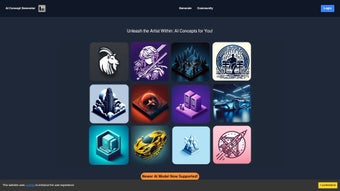
AI Concept Art is positioned as a versatile, browser‑based graphics application that specializes in rapid generation of high‑resolution icons and concept visuals. The user interface is intentionally minimalistic: after logging in, you choose a style category, fine‑tune parameters such as colour, abstraction level, and thematic keywords, then press “Generate.” The AI processes the request on remote servers and returns a set of crisp 1024 × 1024‑pixel images ready for immediate download. The platform’s library houses thousands of pre‑curated icons ranging from flat, minimalist designs to richly textured illustrations, ensuring that designers can match virtually any brand personality.
All generated assets are delivered with a royalty‑free commercial licence, meaning you can incorporate them into logos, marketing collateral, UI mock‑ups, merchandise, or any other commercial application without additional fees. Security is baked into the service; data transfers occur over HTTPS, and temporary cloud storage is purged shortly after download, safeguarding both user privacy and intellectual property.
Key Feature List
- Instant generation of 1024 × 1024 high‑resolution icons and concept art.
- Extensive, bi‑weekly refreshed library of styles, themes, and visual trends.
- Responsive web UI compatible with Windows, macOS, Linux, Android, and iOS browsers.
- Credit‑based pricing that lets you pay only for the assets you actually need.
- Secure HTTPS connection with royalty‑free licensing for unrestricted commercial use.
- Customizable parameters: colour palettes, mood descriptors, abstraction levels, and more.
- Batch generation capability to produce multiple icons in a single workflow.
- Export options include PNG, JPEG, and SVG (vector‑compatible settings).
Installation & Usage Guide
Because AI Concept Art is a cloud‑native service, there is no traditional installation process. Getting started involves a few straightforward steps:
- Create an Account: Navigate to aiconceptart.com, click “Sign Up,” and complete the registration form with a valid email address and a strong password. Verify your account through the confirmation email.
- Acquire Credits: After logging in, head to the “Credits” section. Choose a package that fits your expected usage—options range from 50 credits for occasional creators to 5,000 credits for agencies with heavy demand.
- Select a Template: In the dashboard, click “Create New Icon.” Browse categories such as “Business,” “Gaming,” “Social Media,” or “Nature.” Hover over thumbnails for larger previews.
- Adjust Parameters: Use the side panel to set colour schemes, input descriptive keywords, or modify the abstraction level. Real‑time previews update instantly, allowing you to fine‑tune the output before committing credits.
- Generate & Download: Click “Generate.” The system deducts the appropriate number of credits (typically 5 credits per 1024 × 1024 icon) and returns the finished image within seconds. Choose your preferred file format—PNG for raster, SVG for scalable vectors—and click “Download.”
- Manage Your Assets: All downloads are stored in a personal “My Assets” gallery. From here you can rename files, organise them into collections, or delete any unwanted assets.
For mobile users, the responsive design ensures the same workflow works smoothly on smartphones and tablets. The only prerequisite is an active internet connection, as all AI computation occurs on the provider’s servers.
Operating System Compatibility
AI Concept Art runs in any modern web browser, making it compatible with a wide range of operating systems:
- Windows 10/11 – Microsoft Edge, Google Chrome, Mozilla Firefox
- macOS Monterey, Ventura, and later – Safari, Chrome, Firefox
- Linux distributions with up‑to‑date browsers – Chrome, Firefox
- Android 8.0+ – Chrome, Firefox mobile
- iOS 13+ – Safari, Chrome
The cloud‑first architecture eliminates the need for heavy local installations, meaning performance is primarily tied to internet speed. A minimum broadband connection of 3 Mbps is recommended for optimal generation times.
Pros and Cons
Pros
- Speed: Icons are produced in seconds, drastically reducing design turnaround.
- Resolution: 1024 × 1024 output ensures crisp visuals for both digital and print mediums.
- Library Depth: Thousands of regularly refreshed styles keep designs contemporary.
- User‑Friendly: Intuitive UI requires virtually no learning curve.
- Cost Flexibility: Credit‑based pricing aligns spend with actual usage.
- Security & Licensing: Encrypted transfers and royalty‑free commercial rights.
Cons
- No API: Limits automation for large‑scale enterprises.
- Credit Management: Users must monitor balances, which can be inconvenient for heavy users.
- English‑Only UI: No multilingual support at present.
- Limited Vector Editing: Advanced tweaks require external software.
- Online‑Only: No offline mode; a stable internet connection is mandatory.
Frequently Asked Questions
Below you’ll find answers to the most common queries from designers who are evaluating AI Concept Art for their workflow. These FAQs address pricing, licensing, technical requirements, and more, helping you make an informed decision before you start generating icons.
-
How many credits does a single icon generation consume?
The credit cost varies with resolution and complexity. For a standard 1024 × 1024 icon, the system deducts 5 credits per generation. Batch generation applies the same rate per icon, allowing you to predict costs accurately.
-
Can I use the generated icons for commercial projects?
Yes. Every icon is delivered with a royalty‑free licence, permitting unrestricted commercial use—including branding, marketing materials, and merchandise.
-
Is there a free trial or demo version available?
New users receive a complimentary 10‑credit starter pack, which provides enough credits to explore several styles and evaluate the platform before purchasing additional credit bundles.
-
What file formats can I export?
AI Concept Art supports PNG, JPEG, and SVG exports. SVG files are generated when you enable vector‑compatible settings, allowing infinite scaling without quality loss.
-
How often is the icon library updated?
The development team releases new icon packs and style updates twice a month, ensuring that designers always have access to the latest visual trends.
Final Thoughts and How to Get Started
AI Concept Art fills a clear niche in the modern design ecosystem: a fast, reliable, and cost‑effective method for producing high‑resolution icons and concept visuals without the steep learning curve of traditional graphics software. Its browser‑based architecture guarantees cross‑platform accessibility, while the continuously refreshed library keeps your creative output fresh and on‑trend. For freelancers, startups, and small teams operating on tight budgets, the credit‑based model offers transparent pricing and eliminates the need for expensive subscriptions.
Although power users may miss an API for automation and wish for multilingual support, these shortcomings are outweighed by the platform’s core strengths—speed, quality, and royalty‑free licensing. If you’re looking to streamline repetitive icon design, accelerate concept mock‑ups, and maintain a professional aesthetic across web, mobile, and print projects, AI Concept Art is a compelling option.
Ready to experience the future of icon creation? Sign up now, claim your free 10‑credit starter pack, and start generating polished, high‑resolution visuals in seconds. Transform a simple idea into a market‑ready asset with just a few clicks—your design workflow will never be the same.



.png)



